Tips & Tricks: Print Directly From Desktop
Do you want a quick way to print files from your Desktop without having to open the application first? There’s a quick way to let you print files from the Desktop.
Snow Leopard, which will be released this fall, will have a bunch of new features. While many of the improvements are “under the hood”, one of the visible improvements will be the new UI that Snow Leopard will sport.
In a previous post we discussed the basics of installing and configuring GeekTool to display date and time in a heads-up type display on your screen, however with a little more imagination you can display just about any type of information and data.
IM+ and Beejive now offer Push Notification. Here is a review of Shape Services IM+ 3.1 offering.
Today Apple quietly released an update to their Apple TV, version 2.4. Adding support for iPhone gestures via the Apple Remote App version 1.3. Here is a preview of the new functionality in the Apple Remote App update.
Do you sometimes need a reminder for an important event or meeting? If you leave your home or office computer on at all times, it’s easy with a few steps to setup your Address Book and iCal to send you an email.
Here it is, Beejive 3.0 with Push Notification for the iPhone! We discuss some of its basic changes and give you the pros and cons of their latest release.
So you are trying to format a drive you know is setup for PC or Windows. You keep getting an error stating Disk Erase failed, or /dev/rdisk1s1: partition size not a multiple of 4K. Its not so much an error, but rather a common oversight.
After many months of waiting TweetDeck is finally available on the iPhone. It is available for free and is available in the App Store.
Like its big brother on the desktop, TweetDeck for iPhone also makes use of customizable columns for tweets, replies, direct messages and searches. To move between columns, just swipe between them and tap to make any column active.
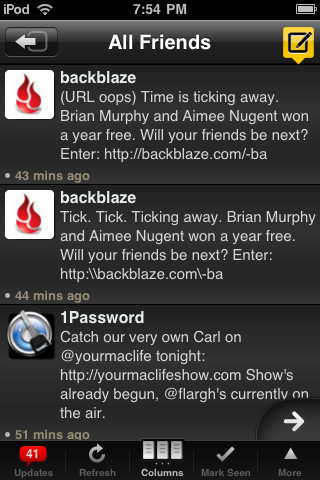
Clicking on a specific tweet brings up the details pane, which allows you to reply, retweet, send DMs, email tweets and even mark as a favorite. An additional benefit of TweetDeck is the ability to use multiple Twitter accounts, with each one in its own dedicated column.
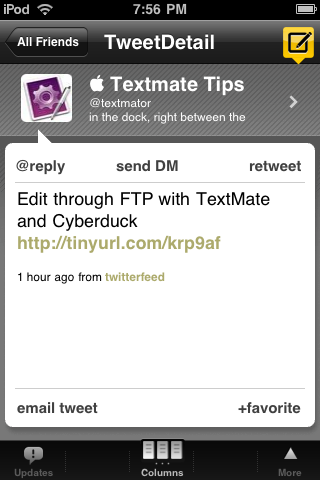
TweetDeck also allows the setup and creation of groups, where you can group related friends together and even setup custom searches. The application also allows you to tweet photos using Twitpic or YFrog and even provides URL shortening.
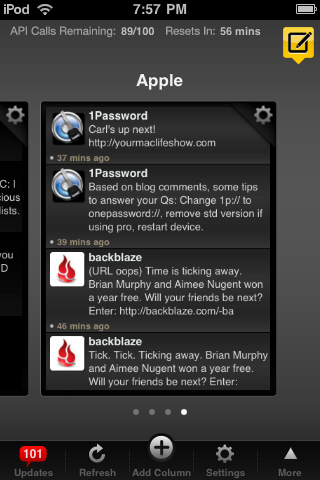
If you are already a user of their desktop application, the iPhone application will sync with the desktop version allowing you to stay up-to-date both with the desktop version and on the road using the iPhone app.
Heres a quick guide on how to enable tethering on any iPhone running iPhone OS 3.0–without jailbreaking–on your Mac.