Disk Utility: Trouble Formatting or Erasing that Windows PC Hard Drive?
So you are trying to format a drive you know is setup for PC or Windows. You keep getting an error stating Disk Erase failed, or /dev/rdisk1s1: partition size not a multiple of 4K. Its not so much an error, but rather a common oversight.
Step 1: The Problem
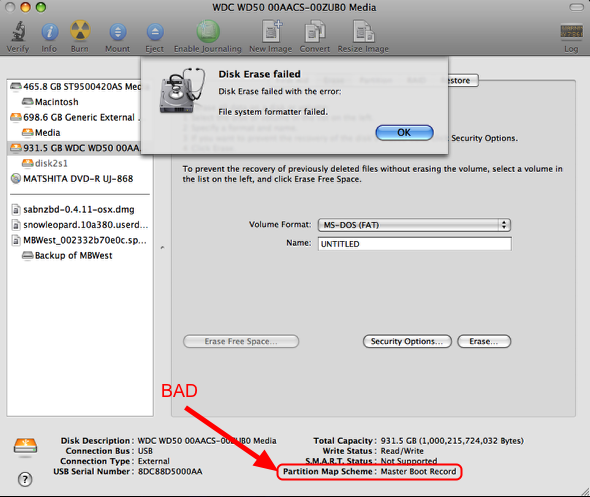
So there you are, with your spare or new internal/external hard drive. You know its formatted for a PC with NTFS or FAT32. So you plug it in and try to Erase it with Disk Utility App with the filesystem Mac OS Extended (Journaled). Only to get a pesky error stating:
Disk Erase failed with error: File system format failed.
or
/dev/rdisk1s1: partition size not a multiple of 4K.
The problem is you are trying to put an incompatible filesystem on the Master Book Record Partition Map Scheme.
Step 2: Solution: Partition Area
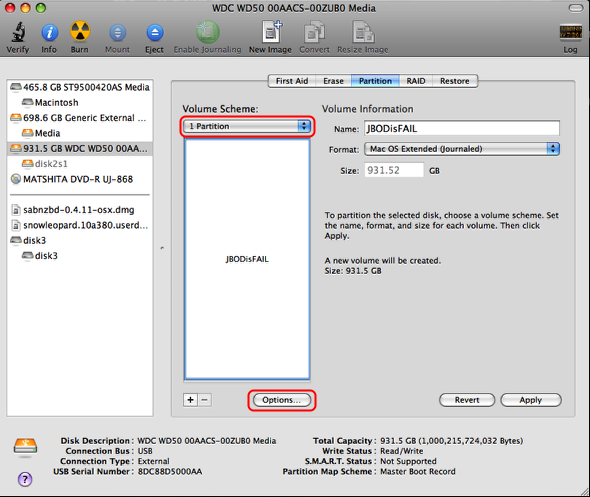
Select the Partition tab. Then select Volume Scheme: and set the desired number of partitions you would like to use.
Step 3: Partition Options + GUID Partition Table
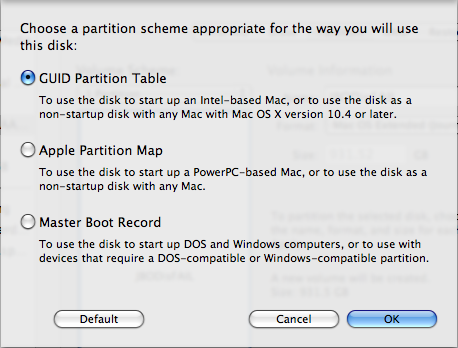
The previous step will bring up the Partition Options. Select GUID Partition Table and click OK.
Step 4: Done!
Now back on the Disk Utility Partition screen notice the Format section now says Mac OS Extended (Journaled).
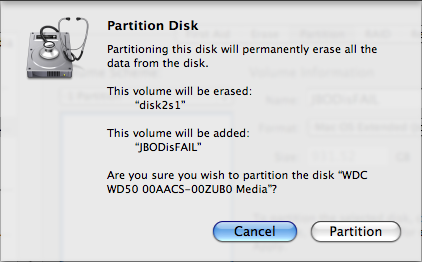
Click Apply and the Partition Disk Waring will appear. Click Partition. **This will erase all data.
That’s it, it will create the partition with GUID options and format the drive in the correct filesystem.


Did you love this post?
Then please share it!


June 23, 2011 at 12:13 pm | andya
Just wanted to say that this article saved me some heartache. As a Mac newbie, I thank you kindly.
July 12, 2011 at 9:31 pm | ppony
I just registered PURELY to THANK the author of this post!!!! I’ve had this flippin external drive for over a year w/o being able to use it! I’ve been in tears for hours trying to get it working today and in minutes, YOU helped me get it done! I bow at your feet! I’m a fine artist, NOT a computer-guru. I’m so easily frustrated. THANK YOU!!!
October 9, 2011 at 11:04 pm | Cosy Cool
I too just reg’d purely to say thanks. If Steve Jobs was SUCH a genius, couldn’t he have made a Disk Utility that is obvious and easy to use…??? Anyway, thank you!
November 5, 2012 at 9:04 am | notinnocent
OMG… i thank you so much !! i had to buy a new HD .. regretted doing so… shud have come across your ‘how to’ earlier.. Thanks again