Photoshop CS4 Disable Canvas Rotation (Zoom & Rotate) via Trackpad Plug-in for Mac
Apple worked closely with Adobe during the development of Photoshop CS4 in order to take advantage of the new multitouch gestures supported by the new Macbook Pro and Air systems. Anyone who has editing in Photoshop with their trackpad will soon notice how easy it is to accidentally activate the Canvas Rotation and begin rotating and zooming your image.
Quick Nav:
Step 1: DO NOT WANT
Lucky for us, Apple and Adobe actually listen to their customers. So they provided the plugin needed to Disable Canvas Rotation (Zoom & Rotate) via Trackpad.
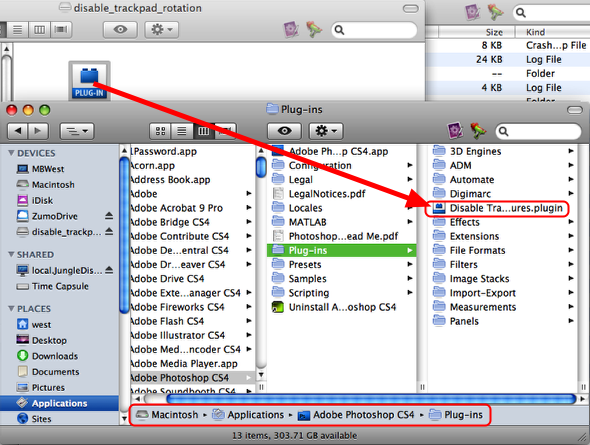
Just drop it into your Plug-Ins folder located at /Applications/Adobe Photoshop CS4/Plug-ins/ and restart Photoshop, and you’re good to go!
Step 2: Location
Adobe, Gestures, Photoshop, Trackpad
Did you love this post?
Then please share it!


March 17, 2010 at 12:08 pm | pringshia
It seems like this rotates zooming in too. Is there a way to make it only disable canvas rotation?
March 17, 2010 at 12:25 pm | Mark
I’m not sure, but have you tried this fix we posted? It sounds like the same issue.